Thursday, October 01, 2015

The Best Way to Learn ASP.NET

You're looking to learn ASP.NET? I can't blame you. Not only is it an extremely flexible platform, but .NET developers are in high demand and will continue to be. Unfortunately, it can be an intimidating platform to learn — especially if you are brand new to development or have never used Java or C++. However, once over the proverbial hump, you’ll find it to be a rewarding and enjoyable platform to develop for. This syllabus is designed to get you up and running on the ASP.NET stack, being able to write your own applications.
Taking a page from Siddharth's earlier guide to learn PHP, disregard the haters. The majority of ASP.NET’s critics are kids who know nothing about the platform other than it was made by Microsoft; they haven't spent five minutes with it to come up with any kind of informed opinion.
While there are certainly valid criticisms of the platform, they are typically made by developers who not only know C# and the .NET Framework, but PHP, Ruby, C++, Java, and other platforms.
ASP.NET isn’t perfect—there is no such thing. But it is one of the most flexible and powerful server-side technologies available today.
I fully recommend you pick C#.
ASP.NET is often incorrectly thought of as a programming language; it is actually a platform built on .NET’s Common Language Runtime (CLR), the component of the .NET Framework responsible for executing .NET applications. Because of this, a .NET developer can use whatever .NET-enabled language they want to write theirASP.NET application. This means you can write an application in C#, VisualBasic.NET, Python, PHP, Perl, and many other languages. As long as there is a .NET compiler for your chosen language, you can write an ASP.NET application with it.
Keeping that in mind, I fully recommend you pick C#. While it may be tempting to pick another language you might be more familiar with, the bulk of information, both in books and on the Web, are geared towards Microsoft's officially supported languages: C# and VB.NET. Additionally, C# was specifically designed for the .NET Framework, and thus, is the most intuitive for using .NET's features. This is one of the reasons why .NET is intimidating; not only do you have to learn the framework, but a new language, too. But it is well worth it in the end.
  • Visual C# 2010 Step by Step: After you pick a language, it's a good idea to get familiar with it. If you want to dig into the C# language before getting intoASP.NET, I recommend Visual C# 2010 Step by Step. It is a very good introduction to the language, and will introduce you to many aspects of the .NET Framework as well. It's not required reading, but you'll have an easier time learning ASP.NET with a solid foundation in C#.
  • ASP.NET from Scratch: Nettuts+ has a semi-fast-paced series calledASP.NET from Scratch, presented by yours truly. The beginning lessons are a couple years old, but Lesson 1 and Lesson 2 give you some background of the platform as well as a brief introduction to ASP.NET. You don't necessarily have to follow along with the examples (they use older tools which you will not want to download),  but watch the first few lessons to get an idea of what you're getting into. The later lessons work with the MVC framework, which  you should wait on learning until a later time. The series was designed to get you up and running with ASP.NET, so it is not as comprehensive as a book might be, but that'll be taken care of with...
Two to be exact. There is no shortage of ASP.NET books in the world, but there are bad books, good books, and excellent books. The two listed here are excellent, and I want you to read them in order.
Nettuts image
Author: Imar Spaanjaars
Beginning ASP.NET 4 in C# and VB starts at the very beginning by walking you through downloading and installing a free version of Visual Studio called Visual Web Developer Express. You’ll then embark on yourASP.NET journey, learning syntax, controls, themes, and other features of the platform. Just as Visual C# 2010 Step by Step gives you solid foundation in C#, Spaanjaars’ Beginning ASP.NET 4 in C# and VB gives you a solid foundation in ASP.NET fundamentals.
Nettuts image
Author: Bill Evjen, Scott Hanselman and Devin Rader
This book dives deeper into ASP.NET to give you a more complete understanding of the platform. It will not only expand upon the topics covered in Spaanjaars’ book, but it will introduce you to other features ofASP.NET and the .NET Framework: sessions, the provider model, membership (authentication and user roles), security, state management, caching, and the list goes on. There is not much this book does not cover, and it will be an invaluable resource you can return to when you need a refresher on a particular feature or topic.
By the time you finish these two books, you’ll have a very good understanding of the platform. So it's time to branch out and...
Reading is one thing; doing is another.
Reading is one thing; doing is another. While you undoubtedly followed along with the examples in the previous listed books, doing something on your own is one of the best ways to learn. So for this assignment, write something. Building your own blogging engine, forums, or to-do list will put what you've learned into practice. Start small and add more to your project as you finish a piece. Make sure you include the following features:
  • Database-Driven: It should be database driven. Use Microsoft's SQL Server Express as your data store, and design the tables you'll need for your application. If you're new to designing databases, it's typically a good idea to think of your data as logical objects. For example, a blog app could have a table called BlogPosts where the table's fields describe blog posts (title, posting, date of post, etc). Keep it simple and logical.
  • UI: It should have a "front-end." By this, I mean the portion of the app that visitors would see; it's the content that your project is supposed to display. If you build a blog, it's the blog posts, archives, etc. If you're building a forum, it's the threads and posts contained within the forum. If it's a to-do, list, it's the tasks you (or other users) are to keep track of.
  • Admin: It should have a "back-end." This is the administrative portion of the project, where you maintain the blog posts, forum, or to-do list. Make sure you protect it by requiring administrators to authenticate.
Never fear to crack open a book or ask questions on the Web. Sites likewww.stackoverflow.com and forums.asp.net are valuable resources where you can ask questions and get tips from pros who have used the platform for years.
For extra credit, add in users and roles.
  • For a blog, add the ability to have multiple authors post blog posts, and give them roles that determine what privileges they have.
  • If a forum, add the capability for users to sign-up for an account and start and add to topics. Also use roles to determine what users can and cannot do. Add moderators and super-admins for extra extra credit.
  • If a to-do list, make it multi-user capable, where users can have their own unique and private to-do list.
Naturally, you'll need some way to administer these users and roles, so be sure to add that capability to your "back-end."
The WebForms technology you have been using up to this point is just one of the programming patterns you can use to create ASP.NET applications. A second programming model is ASP.NET MVC. It's still ASP.NET but uses a different programming pattern called Model-View-Controller (MVC), and it is noticeably different than WebForms.
To get started with the MVC Framework, watch the following ASP.NET from Scratch lessons:
These lessons will get you up and running on the MVC path quickly.
Nettuts image
Author: Jon Galloway, Phil Haack, Brad Wilson, K. Scott Allen
Parts of this book will be reviewed from the ASP.NETfrom Scratch screencasts, but it does cover other topics such as Test Driven Development (TDD), security, and extending MVC, as well as dive deeper into topics covered in the ASP.NET from Scratch videos. This is a must have resource for any ASP.NETdeveloper wanting to grasp the MVC Framework.
Nettuts image
Author: Steven Sanderson, Adam Freeman
Once again, there will be review material, as many topics are covered in ASP.NET from Scratch and Professional ASP.NET MVC 3, but this is an excellent resource to give you other developers' perspective on the MVC framework.
Just as writing something for Assignment 3 helped solidify your understanding ofASP.NET WebForms, you need to write something using the MVC Framework. When I learn a new language or pattern, I like to rewrite an existing project using my newfound knowledge. So for this assignment, rewrite the app you wrote for Assignment 3, but use the MVC Framework instead of WebForms. This rewrite should adhere to the same requirements as Assignment 3, and it has the same extra credit.
Once again, don't forget that you're not alone; use your book or visit www.stackoverflow.com andforums.asp.net if you get stuck.
Many Microsoft employees involved with ASP.NET blog and tweet regularly, but not every ASP.NET master works for Microsoft. Be sure to follow these guys and subscribe to their blogs:
  • Scott Guthrie (@scottguweblogs.asp.net/scottgu/) is one of the original architects of ASP.NET and offers informational tweets and blog posts on the subject (particularly new stuff).
  • Scott Hanselman (@shanselmanhanselman.com/) tweets a lot, but he provides a ton of information on .NET and technology in general.
  • Phil Haack (@haackedhaacked.com/) also works for Microsoft in the MVC team, and his information blog posts cover a wide array of ASP.NET topics. He's also responsible for NuGet, a package management utility for Visual Studio and .NET apps.
  • ASP.NET Team (@aspnetwww.asp.net) is the ASP.NET website, featuring community spotlights, forums, and tutorials.
Microsoft releases several Community Technical Previews (CTP) before every major release.
Computer technology is a fast-paced industry, and ASP.NET is no exception. Since its release in 2002, ASP.NET has gone through five major versions (and one point release), with a new version coming in 2012, and ASP.NET MVC has seen three versions since its 2009 release. Things move rather quickly, and keeping up with the changes and improvements of new versions are a necessity.
Thankfully, it is relatively easy to stay current with ASP.NET. Microsoft releases several Community Technical Previews (CTP) before every major release. Not only do you get to play with the new features in the upcoming version, but you have documentation, including a thorough "what's new/changed", with every CTP release.
This lesson plan will get you on the road to ASP.NET goodness. It's a fantastic platform, and it gets better with every new version and point release. If you have any questions, feel free to ask them in the comments or tweet me. If you have anything to add, please share it with the rest of us in the comments. Thanks, and I hope you enjoy ASP.NET!
--------------------------------------------------------------------------------------------------------------------
Reposted From : http://code.tutsplus.com/tutorials/the-best-way-to-learn-aspnet--net-22404

The Best Way to Learn Python

Python is more popular than ever, and is being used everywhere from back-end web servers, to front-end game development, and everything in between. Python is a true general purpose language and is quickly becoming a must-have tool in the arsenal of any self-respecting programmer.
But Python isn't popular just because it's popular. It is easy to learn, reads like pseudo-code, and is wickedly agile. However, learning any new language can be a daunting task, and finding the right places and people to learn from is half the battle. That's where this guide can help. This is your blueprint for making Python easy, fun and rewarding to learn.
At the time of this writing, there are two main versions of Python in circulation: Python 2.7 and Python 3.2. Which you choose to learn really doesn't matter too much, as the differences will be minimal—especially to a beginner. But you should know that, while Python 2 has far, far more 3rd party support, Python 3 is the primary focus of the developers designing the language. The choice is yours, but if your code acts differently to any given tutorial, make sure you use the same Python version used in the tutorial.
Wikibooks is always a great source to learn something new, and Python is no exception. Here you will find a solid and to the point series of guides that will teach you the ropes of Python. It doesn't get too technical, and you can jump into coding something somewhat useful and rewarding pretty quickly. Because of this, I recommend this site as the best place to start on your Python journey.
You won't find a better source of information than the official python.orgdocumentation. However, if you want to jump right in, as I'm sure many of you will, this might not be the best place to start.
The content tends to be more technical than wikibooks, which will be helpful later on as you progress through the language. But, for a beginner, it may just get in the way of what really is a very simple and beautiful language.
For beginners, the biggest difference between Python 2 and Python 3 will most likely be that Python 2 can use print without parentheses. Python 3 requires parentheses, but that's all.
TheNewBoston's playlists are always great, and you can learn a whole host of languages. ‘Bucky' is a great instructor because he strikes a really great balance between being funny while also being easy to listen. I highly recommend any of his playlists—especially his Python playlist. He assumes zero prior knowledge of programming and will leave you with a firm grasp of the language.
A little closer to home is Giles Lavelle's intro to Python. Like TheNewBoston's series, Lavelle also assumes zero prior programming experience.
If you want to see some real-world applications of your applications, or would like to aim towards web development with Python, this series might be the one for you.
The screencast takes you from nothing to building a dynamic website using a Python web framework called Django.
StackOverflow isn't just full of 'newbie' errors and problems.
ShowMeDo has a huge catalogue of Python related videos. While it may not be the most user friendly experience around, the videos range in level from absolute beginner to the most advanced Python techniques. It is well worth checking out.
This tutorial is pretty specific in terms of what you're going to learn, and I do not recommend it for a complete beginner. I feel, however, that it's worth a mention. In this guide, Chris Kiehl shows you how to build a very interesting Python bot that will play a simple game for you. The tutorial really goes to show the power of Python; it can be applied to do everyday repetitive tasks that you may have on your computer.
Its hard to beat a good book when your trying to learn something new, and with the great community that has developed around the Python language, there is a plethora of free high quality e-books to choose from. Below is a quick list of some of the best. You can download a free e-book version for each of them, or you can choose to buy the physical book (or donate) if you want to support the author, which I'm sure they would greatly appreciate.
Despite the name, Learn Python The Hard Way makes learning Python incredibly easy—the way it's meant to be! In this book, Zed A. Shaw works from the ground up giving you a detailed and comprehensive guide to Python without getting in your way of the actual coding. Shaw is informal but thorough, making the book an easy but rewarding read.
You won't find a better source of information than the official python.org documentation.
As the sub title might suggest, “How to think like a computer scientist”, Think Python stays a little more towards the theoretical side of things. This may prove a little frustrating for a total beginner, but the book is well worth the read in regards to algorithm theory and high level concepts.
If ‘learning by doing' is your thing, then building your own game will prove to be a rewarding experience! In this book, Al Sweigart assumes no prior knowledge of Python and takes you all the way to building your own game. Given that the book is geared towards game development, the book may move a little quickly for a total beginner. Later on in this article, I mention a similar book of his where he assumes a prior knowledge of Python. If you feel you are have a good grasp of the language, then his other book might be a better resource for you.
If you want to learn Python for web development, then you're probably going to be using the Django framework. This book assumes fluency in Python, but it teaches Django as if you are a beginner to the framework. The Django Book is as good as they come and will be invaluable for any budding web developer.
If you don't have enough to read yet, or want a book on a specific topic, then you should follow this link. The folks over at python.org have complied an extensive list of books, sorted by difficulty and topic.
Thousands of developers have experienced every problem that you are bound to face. StackOverflow is a great resource where developers find solutions to their problems. When you happen upon an error that you're not sure how to fix, search StackOverflow. You will more than likely find a solution and how other people solved their problem.
But StackOverflow isn't just full of 'newbie' errors and problems; there are some really clever and helpful people that use the site - learn from them!
Take a look at the Hidden features of Python thread, for example.
Many of the tips and tricks you see here may not be covered in many formal tutorials, but they will be extremely helpful for intermediate to advanced Python users.
Project Euler (pronounced ‘Oil-er', to save you some embarrassment later on) is one of my favorite websites. After making an account, you can work through the ~400 problems on the website. Each problem is about 50% mathematics and 50% programming and, in my opinion, the most rewarding way to learn more of either subject.
The problems start off easy to test your knowledge of the language, but grow in difficulty to challenge even the most seasoned programmers. Eventually, the difficulty of the problems will force you to find the most efficient algorithm - that is if you don't want to wait hours to compute the answer.
Nothing will turn you into a programming wizard more quickly than pushing yourself for the fastest and most efficient solutions to the Project Euler problems.
When you crack a new problem, you gain access to that problem's forum thread where many people discuss their solutions and ideas with one another. Many of the solutions in later pages of the thread will be in Python. This is really the key to growing your programming prowess. If there is someone with a solution that is faster than yours, take the time to analyze it to see where you could improve your own solution. Over time, you will pick up all the tricks of the trade and grow your Python knowledge in a meaningful and rewarding way.
Additionally, there are also some really great blogs that work through the Project Euler problems in Python. If you are stuck on a problem, there is no shame in having a sneak peak at other developers' work, as long as you intend on learning from it. Here are two of my favorite:
Few things are more satisfying than building your own game.
Few things are more satisfying than building your own game. It can be a steep learning curve, but well worth it and very rewarding. PyGame is the best known game library for Python, and you will be able to find many free tutorials on it. Here are some of the best PyGame tutorials. 
As with the case of the original Python tutorials, the developers of PyGame also have their own intro documentation. But these may be overly technical if you want to jump straight in and start building your game. Developer documentation, however, will always be your best source of information; so, I still recommend you get familiar with the site.
This free e-book by Al Sweigart runs through the PyGame library, taking you from zero knowledge to building a couple of games for yourself. The simple games will provide you with a perfect platform to start your own projects, if you are so inclined. Sweigart provides extensive and detailed comments throughout all of his code to help you learn as you go.
This is another Playlist from TheNewBoston. It serves well as an intro to PyGame. It assumes zero knowledge and gives you a good feel for the PyGame library, but unlike the InventWithPython guide, it is more to the point and won't bring you to making your own full game.
Python is a general purpose language that can do almost anything; so, of course, there is a seemingly endless supply of libraries and tools out there. Here are some of the most popular.
If you ever want to scrape a HTML for some information... BeautifulSoup will do all this for you and add years to your life.
If you are doing some CPU intensive work, and you find that Python is proving itself to be a bottleneck, then maybe you need PyPy. PyPy is an alternative compiler for Python that can really speed up your processing.
These two usually go hand in hand (SciPy is dependent NumPy). If you are doing some serious number crunching for mathematical or scientific research, then these two libraries will be your best friends. NumPy and SciPy extend the mathematical functions and capabilities of Python and can greatly speed up some of your tasks.
BeautifulSoup really is beautiful. If you need to scrape a HTML page for some information, you will know all too well the frustration and hair loss that it can bring. BeautifulSoup will do all this for you and add years to your life. Highly recommended and fun to play around with.
The Python Image Library (PIL) is an extensive library that is great for anything to do with images. If you need to manipulate an image, chances are PIL can do it for you.
As mentioned previously in the article, the Django framework is what you will probably use if your aim is web development. It is the most common web framework for Python and also has the most learning resources available.
After you have a decent grasp of the language, being able to read and understand other people's code is always an important skill to have - not to mention that it is a really great way to learn too.
For this reason, open source projects are great. Github or Bitbucket are the to go-to places for this. Don't worry about people judging your code, you don't have to contribute right away. You are always free to fork a project, tinker with it yourself, and see how things work. If you do happen to see something that you think could be improved, great! Go for it and submit your improvement. That's what open source is for.
I hope I have been able to provide a solid base of Python knowledge for you. If there are other places of interest that you think should have been included in this syllabus, let me know in the comments below to help others out!
------------------------------------------------------------------------------------------------------------------
Reposted From : http://code.tutsplus.com/articles/the-best-way-to-learn-python--net-26288

The Best Way to Learn PHP

Learning something from scratch is almost always an arduous affair -- you simply have no idea as to where to start, or not to start, to kick things off. I loathed learning about the idiosyncrasies of C++'s syntax when all I wanted to learn were some darn programming concepts. As I'm sure you can agree, this is a less than ideal situation.
This is where the Nettuts+ "The Best Way to Learn" series comes into the picture. This series is intended to be your blueprint, your road map, your plan of action for learning your topic of choice! You don't have to worry about finding the best resources, sorting out the bad ones, and figuring out what to learn next. It's all here. Just follow it, step by step.
Today, we're going to figure out the best way to learn PHP.
If you're reading this, chances are that you've Googled a lot to decide which language to learn and how. And without a doubt, you must have run into a ton of articles about how language X is so much better than PHP - and PHP is going to die through obscurity soon.
Haters gonna hate!
As the popular saying goes, haters gonna hate! PHP has been at the helm of the web as you know it and that's for a very good reason. It's a mature language, has excellent documentation and a massive number of learning resources along with a great variety of utilities built around it.
And let's not forget the sheer proliferation of hosts and frameworks PHP has spawned. Like Heroku like hosting? Don't worry, there are a number of excellent options for PHP as well!

Tut image

You could just install PHP but it gets quite boring without a server and some sort of database to play around with. And as a beginner, it's not really trivial work to get all of these installed and configure each to work with the others without issue.
This is where you grab a package such as XAMPP. These life savers typically install Apache, your web server, along with mySQL, a database system along with PHP significantly cutting down on set up time.
Bonus points if you're the code monkey type and install everything by hand.
Before I send you off to alternate sources for PHP enlightenment, let me first refer you to our very own series for absolute beginners from none other than your favorite editor, Jeffrey Way.
In this series, over the course of 40+ screencasts, everything from installing PHP to variables, from functions to working with MySQL is covered.
You won't find a better introduction to the PHP language than this series, and, while it's unfortunately not free, you can subscribe to Tuts+ Premium for a mere $19. It's absolutely worth it!

Tut image

Khan Academy may sound like an odd choice since there are no PHP lessons in there but trust me, it's a good choice. What you can't find in pure PHP, you can find in the basic of programming. For example, if you're new to the entire programming hoopla, this is a great place to start.
Another great place to start is Lynda. Here at Envato we have immense respect for those teaching there -- the content is usually top notch and cover their topics well. And they cover a vast range of topics as well. If you need a specific lesson, this is where you should begin.
The videos should give you an very good springboard, but, hopefully, hungry for more knowledge. The below books should give you a more elaborate introduction and lots of varied topics for you to devour.
If you feel bored reading the initial portions, good, just skip ahead to the portions where your head hurts.

Nettuts image

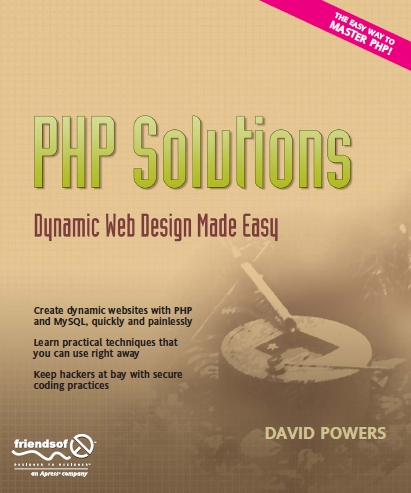
Author: David Powers
“So why another PHP book? Well, not everyone who uses PHP is a programmer. PHP is the most common dynamic web language used by designers, if their web sites require dynamic functionality, and there are hordes of novice users who want to set up dynamic web sites.”

Nettuts image

Author: Jason Lengstorf
“PHP for Absolute Beginners starts at the very beginning stages of web programming, showing even the most inexperienced web developer, through examples, how to build a basic content management system. The book dives directly into writing web applications with accompanying explanation rather than explaining elements of the language and then showing examples.”

Nettuts image

“PHP Cookbook has a wealth of solutions for problems that you’ll face regularly. With topics that range from beginner questions to advanced web programming techniques, this guide contains practical examples — or “recipes” — for anyone who uses this scripting language to generate dynamic web content.”
This is the perfect time to build something simple with your new found knowledge.
Alright! With all those information swirling inside, you should feel like a rockstar. If not, don't worry, it's completely normal. Talk to me later so we can share notes about how daft we feel.
This is the perfect time to try and build something simple with your new found knowledge. It's best to not try to build something too complicated and fail though -- it's a lot more disheartening than you'd think. Imagine being rejected for the first time. Now multiply it by a few hundred and you'll be close.
Since you're just starting out, play it safe and build something absolutely basic like a CRUD app. Nothing major -- a few inputs and an 'uncool' table to display saved results. This tiny exercise will test your knowledge of a lot of PHP basics including the much vaunted 'interfacing with a database' skill.
Feeling better now? You should! You gazed upon where there was naught and said 'This won't do!' and created something from scratch. If it were me, I'd be pumped. Let's use it to extend our knowledge a little more.
While a simple CRUD app is a great start, you'd ideally need more complicated. A simple login/user system is absolutely great for this.
You get to learn how sessions work, how basic authentication is done, how to implement basic security measure and a ton more.
Note: If you're in need of a little guidance, start here.

Tut image

At this point, after creating a non-trivial system, you probably have noticed how repetitive some of the work is. Why the heck do you need to write your own sessions class or work on hashing passwords yourself? The answer, my friends, is to go with a lightweight framework.
A framework abstracts a lot of the repetitive, boilerplate features in your typical application thus freeing up your brain to actually getting things done.
Note: Not to toot our own horn but we have an immensely thorough session that covers almost all of the important parts of CodeIgnier, a very lightweight, yet powerful framework. If you prefer Kohana, we do that too!

Tut image

Now that you've been with a lightweight framework, you can now check out the alternate path -- a full stack framework. A full stack framework typically ships with a lot more features including code generators, ORMs and an inbuilt server. An excellent choice would be CakePHP -- the PHP equivalent of Rails.
The reason you need to check these out later is because there is a lot of 'magic' going on. Without a solid understanding of how lightweight frameworks work, it's hard to really dig into the better featured ones since you'll mostly be lost and won't understand how things work.
Note: The Nettuts+ team recommends both FuelPHPand Laravel as top-notch, modern PHP frameworks.
With all that information behind you, giving you Indiana's swagger, now is the time to build something truly awesome. This is the final destination for PHP nirvana -- and the choice is up to you.
So what exactly should you be building? Here are a few ideas:
  • A blog is always a safe option. There are a ton of open source solutions for you to get inspiration for the software architecture and the functionality requirements are unambiguous.
  • It's a little old school but a discussion board is another excellent choice. Moderator rights and post counts, ahoy! If you need a little guidance, thistutorial is a great place to start.
  • Or if you're too hip for any of these, build yourself a project management application or even just a todo list. They're always fun to build and you'll almost always end up using it personally.
Of course, there are just suggestions. No one is stopping you from building a multi-user, realtime chatroom or a service which receives input from random internet strangers and lights up stuff in your room. No one's judging, go crazy!
Development is as much about the workflow as much as it is about the code.
Development is as much about the workflow as much as it is about the code. Recently, a typical developer's workflow has been massively improved by version control as well as platform as a service solutions.
Version control, as expected, frees you up from having to manage revisions manually while PaaS solutions save you from having to do a lot of sys admin work just to get your app to scale.
Resources for the latter are a bit hard to find but here is an excellent screencast on getting started with Git.
New techniques and tools are being introduced everyday.
The web development industry is rarely in a state of equilibrium -- everything is changing all the time. New techniques and tools are being introduced everyday and it's important that you not only read about them but also start contributing.
Find a little glitch in some framework? Submit a patch. Added some new functionality? Patch away! These not only earn you good karma but also valuable points on your resume.
And, oh, about the keeping up to date stuff? Subscribe to our feed and follow us on Twitter and I promise you'll know all you need to know!

Tryruby

Even though that you are a master of the PHP domain, you can't afford to, or shouldn't, rest. PHP is a grand language but that doesn't mean that it does absolutely everything perfectly.
There is an ever increasing number of new languages out there each adding their own spin to solving a very specific problem that you simply can't afford to miss out on. And learning something new something doesn't really wipe out knowledge gained earlier does it? Well, except Star Wars, of course. Those new movies were a crapshoot.
Ruby, Python and Clojure are some of the languages that I'm constantly amazed by and I think they deserve your attention as well. Neither of these languages are necessarily 'better' than PHP but each of them do things their own unique way and you owe yourself a chance to take a look and find out whether that approach is for you. While we're a bit low on Clojure related content, we do have excellent tutorials on Ruby and Python right here.
Well, this is the end of the road, partner! Hopefully, this plan can help you become a PHP master and, indeed, take over the world.
If you feel that I'm missing some obvious resources here, feel free to yell at me in the comments section below and I'll update this article whilst crying silently. Thank you so much for reading!
-----------------------------------------------------------------------------------------------------------------
Reposted From : http://code.tutsplus.com/tutorials/the-best-way-to-learn-php--net-22287